
How to File Your Own Canadian Tax Return:
A simple FAQ + one very important thing for first-time filers
Before we dive in, the information on this page does not apply to you if:
- You were a non-resident for tax purposes, or
- You left Canada permanently during the tax year.
In these cases, you cannot file online, as there is no software for such situations. Instead, you must submit your Canadian tax return on paper.
Situations, when you should get professional help
In the following cases, it’s strongly recommended to speak with a tax professional. The rules can be complex, and Canada has tax treaties with many countries to prevent double taxation.
- If you earned foreign income while in Canada (e.g. by working remotely for an employer in your home country)
- you must report it as taxable ‘foreign income’ on your Canadian tax return.
- Any tax already paid abroad can usually be claimed as a foreign tax credit.
- If you had self-employment income
- it can also be more complex due to many business expenses and deductions you may be able to claim.
- If you rented out your home outside Canada, that counts as rental income that may also be taxable in Canada.
Online tax filing opened on February 23, 2026 for the tax year 2025
Filing Deadline: April 30
The Canadian tax year is from January 1 - December 31

Common questions for the Canadian tax return
What documents do I need?
Around February/March, you’ll receive your T4 slips from your employers. A T4 is a summary of your earnings and deductions for the year.
You should gather the following before filing your tax return:
- Your SIN (Social Insurance Number)
- All T4 slips from every employer (if you had more than one job)
- T4E slip if you received Employment Insurance (EI) benefits from Service Canada
- T5 slip if you earned more than $50 in interest income from your bank
- Details of any foreign income earned before you came to Canada
Make sure to wait for all slips before filing. Refiling your tax return because a T slip arrived late can be a hassle and may take around four months to process.
How do I get the T4 from the employers?
Employers are required to issue all T4 slips by the end of February. Larger employers often wait until the final deadline, which is why the CRA opens online filing relatively late.
Typically, employers issue T4s through their payroll system, where you can log in and download a copy. If you no longer have access, you can request a PDF copy by email.
Alternatively, they may mail the T4 to the address they have on file, so it’s important to keep your address up to date. In this case, allow until mid-March, as Canadian mail can be quite slow.
T4 slips can be accessed through your CRA account, since employers submit a copy directly to the CRA. However, if you have never filed a Canadian tax return before, this option will not be available to you.
If you haven’t received your T4 by mid-March, contact your employer and ask for a copy. You can politely remind them that there is a late-filing penalty, starting at $10 per day. > Here is the link you can send them for more pressure. <
If you don’t get an answer, you have options that > are shown here. <
Will I get money back?
It depends on your situation — but many first-time filers and newcomers do receive money back. You will receive a refund if too much tax was deducted from your pay.
Your tax refund as a temporary worker depends primarily on three things:
- How much you earned in total
- How much tax was already withheld from your paychecks
- When you entered Canada during the tax year (yes, the date of entry matters a lot in your first tax return)
Can I file my Canada taxes online if I file for the first time?
Yes! Even if this is your first time filing, you should be able to file online if you can provide a Canadian address.
Sometimes, though, the information in your CRA database might not match what your tax software has. If that happens, online filing won’t be possible, and you’ll need to file a paper return.
Don’t worry—this isn’t a big problem. You can simply print the tax return you created in your software, sign it, and mail it to the CRA.
You can find the correct mailing addresses > here < under “Resident individuals”
Which software do I use for the Canadian tax return?
If you’re still in Canada and have a Canadian address, it’s pretty easy to file your own taxes if your situation is simple—for example, if you only earned employment income. Free tax software like Wealthsimple Tax works great for this.
Some people use TurboTax, though it can feel overwhelming because it asks many questions to prepare the tax return.
⚠️ You don’t need a CRA account to file your taxes online.
When using the software, ignore any prompts to import your T4, register for a CRA account, or visit the CRA website—first-time filers can’t use those features yet. Just skip those steps and enter all your information manually.
How do I know I am a resident for tax purposes?
There’s no one-size-fits-all rule when it comes to determining your tax residency in Canada. While spending more than 183 days in Canada is one factor, it’s not the only one. What really matters are your residential ties—both in Canada and in your home country.
It’s also important to remember that Canada’s tax system is based on residency status, not immigration status.
Wondering if you’re a resident or non-resident for taxes? Click > here to find out! <
To help you with the decision:
- Did your spouse/common-law partner and/or children accompany you to Canada?
- Did you buy or rent a home with a rental contract? (not as a roommate or in staff accommodation)
The following are secondary residential ties that can further support your tax residency. Did you:
- Open a Canadian bank account?
- Buy a car?
- Exchange your driver’s licence during the tax year?
- Obtain health insurance with a Canadian province or territory?
The more secondary ties you have, the stronger your case for being recognized as a tax resident.
As a tax resident, from the date you entered Canada and activated your IEC work permit, you are liable for Canadian taxes on your worldwide income, meaning you must report all earnings, both inside and outside Canada, on your Canadian tax return.
Here are some important links you can use to determine your tax residency:
- The CRA has a guidance on tax residency determination > here <
- For more information on residential ties, see Income Tax Folio S5-F1-C1, Determining an Individual’s Residence Status
- If you are still unsure, you can fill out a form to get the CRA’s opinion on your tax situation (processing of this form could take a few months): Form NR74, Determination of Residency Status (entering Canada)
I was still in Canada on December 31st of the tax year, can I still file with a software?
Yes you can, even if you left shortly after in the new year.
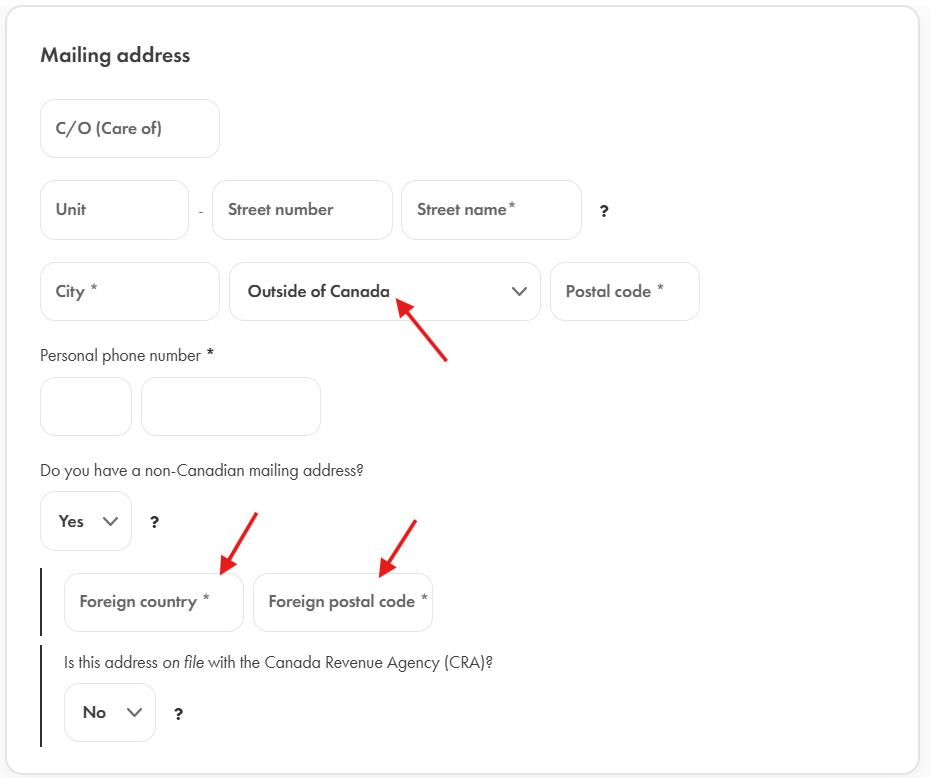
For example, if you moved away in January or February following the tax year and therefore no longer have a Canadian address to include on your return, you can still file using tax software. Simply enter your foreign address in the program.
In this case, you will need to print the completed return and mail it to the CRA. The software will provide the necessary instructions for submitting your documents. Below is a screenshot from the Wealthsimple Tax Software.
What is important to know as a first-time filer who entered Canada in the tax year?
When using the tax software, make sure to carefully answer all the questions—it’s important that your information is accurate. The questions are all pretty straightforward, so there’s no need to go into every single detail.
However, two key questions to look out for is:
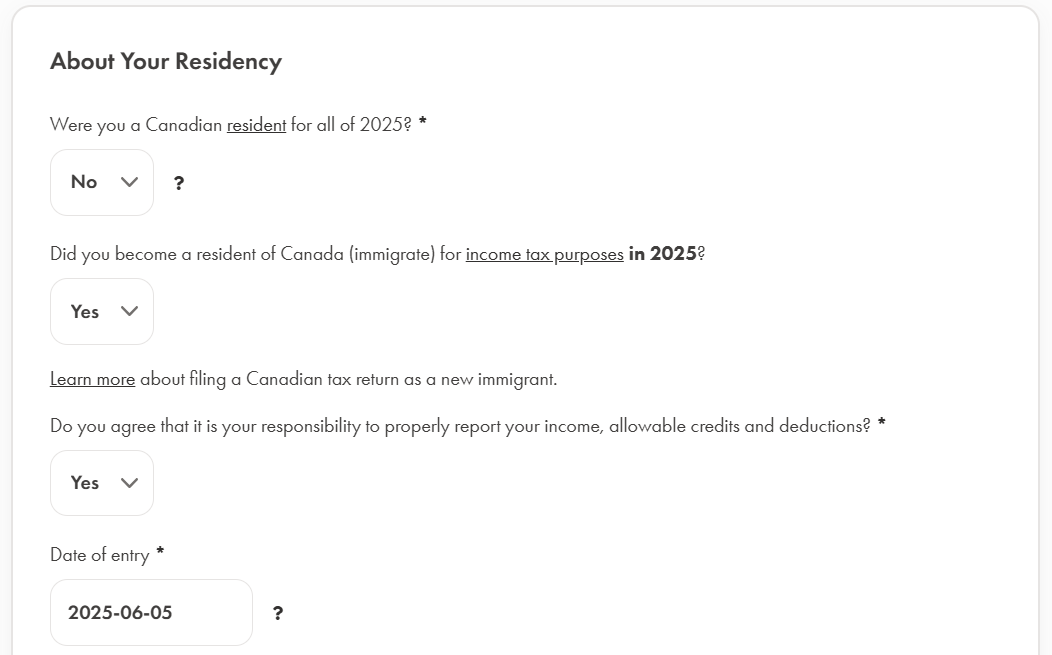
“Were you a Canadian resident for all of [tax year]?”
If you entered in the tax year, you must answer ‘No’.
“Did you become a resident of Canada for income tax purposes in [the tax year]?”
(See screenshot below)
If you entered Canada during that tax year, select “Yes” and enter your entry date.
The software will then ask about your income before you arrived in Canada (the time when you were not yet a resident).
If this applies to you:
- Enter the amount in the “Foreign-source income” section.
- You must report the amount in Canadian dollars (CAD).
- To convert your foreign income, use the official exchange rate from the >> Bank of Canada.
If you didn’t earn any income from January up to your arrival date, simply enter $0 in that section.
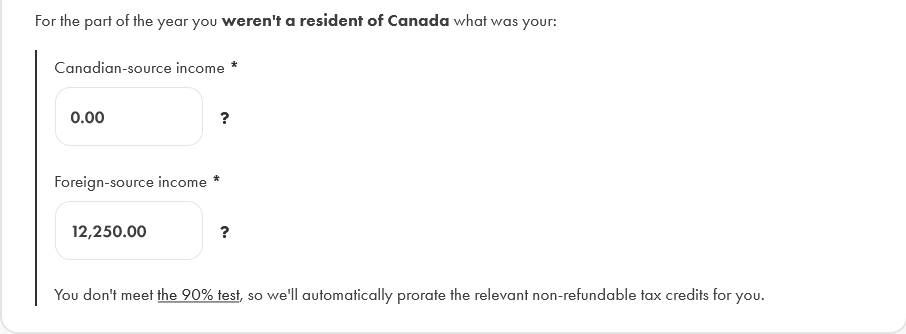
⚠️ Income earned before arriving in Canada is not taxed in Canada.
The tax software only uses this information to calculate any additional credits and benefits you may be eligible for. To correctly calculate these credits, your world income (income earned both inside and outside Canada in the tax year) must be reported.
It’s really important to complete this step correctly.
If you skip it and don’t report the date of entry, the software will assume you were a full-year tax resident, even if you only lived in Canada for part of the year. This causes it to calculate the full amount of tax credits, which isn’t accurate for part-year residents.
⚠️ If you entered Canada in the tax year, you cannot claim the full year tax credits.
The tax credits must be prorated exactly for the time you spent in Canada.
That’s why the software asks for your exact entry date. The purpose of entering your entry date is to make sure the software knows you were only in Canada for part of the year. It then automatically pro-rates your tax credits based on how long you were a resident in Canada.
✅ You don’t need to do the calculation yourself — the software will handle it automatically.
For presentation purposes, here a very simple example:
The federal tax credit for the tax year 2025 is $16,129
You entered Canada on October 1, 2025
($16,129 : 365 days) x 92 days spent in Canada = $4,065.39
The software will automatically claim $4,065.39 in federal tax credits on your return.
Do you notice the difference compared to the full tax credit amount of $16,129?
Employers usually base their tax deductions on that full-year amount, which is why the numbers might not perfectly line up at tax time.
Depending on how much tax was already deducted from your pay, you may either get a refund or owe a bit back.
The same applies to provincial tax credits — the software will automatically pro-rate those too. Each province has its own specific credit amounts.
Wondering why your tax refund is lower than expected?
Is tax filing mandatory in Canada?
You have to file taxes if any of the following applies to you.
- You have to pay tax for the year
- You want to claim a refund
- You want to claim the Canada workers benefit (CWB) or you received CWB advance payments in the year
- You want to claim the GST⁄HST credit
- The CRA sent you a request to file a return
- You were self employed and your total income for the tax year was over $3,500
The entire list >> here << on the official government homepage
I entered Canada in the tax year, but I didn't earn money in Canada. Do I have to file taxes?
In general, if you didn’t earn any income in Canada during the tax year (up to December 31), you don’t need to file a Canadian tax return.
For example, if you arrived in Canada in October but only started working in the next tax year, you’re not required to file for that first year.
However, you might be missing out on some extra money from the Canadian government if you skip filing.
If you established residential ties in Canada and can be considered a tax resident, it’s a good idea to file a return with $0 Canadian income and report your income from before you entered Canada (as explained in the steps above).
Why it’s a good idea to file a Canadian tax return, even with $0 income:
Claim government benefits and credits
- GST/HST credit: Paid quarterly to eligible residents.
- Canada Child Benefit (CCB): If you have children.
- Canada Carbon Rebate (CCR): Paid in provinces that participate.
Filing a return ensures the CRA has the info it needs to calculate these correctly.
After the first tax return, you can also register for a CRA online account, which allows you to:
- Keep your mailing address and personal info up to date.
- Set up direct deposit so all future CRA payments, including next year’s tax refund, go straight into your Canadian bank account.
How long is the processing time for a Canadian tax return?
It depends on how you file your tax return.
- Online tax returns take about 8-10 business days.
- By regular mail as a resident: about 6-8 weeks
Does the CRA offer direct deposit to bank accounts?
Yes, the CRA offers direct deposit to Canadian bank accounts. However, your first tax refund will usually be issued as a cheque. Once your first return has been processed, you can:
to receive future tax refunds and other tax benefits into your Canadian bank account.
I had interest income in my savings account and did not receive a T5; should I include it in my tax return?
T5 slips are only issued by the bank, if the amount is over $50 for the tax year. Even if you don’t receive a T5, you still must report all income sources, including interest, on your tax return.
How do I proceed if I did remote work for an employer in my home country?
If you worked remotely for a company in your home country while living in Canada, things get a bit more complicated.
- You must report this foreign income on your Canadian tax return in the “Foreign Income” section.
- You may be able to claim a foreign tax credit for any taxes you already paid abroad.
Because of tax treaties and double taxation rules, it’s a good idea to consult a tax professional to avoid mistakes.
The same goes for self-employment income—it’s even trickier because of the many business expenses you may be able to claim.
It’s best to avoid regular taxback services like H&R Block—they may not handle your tax return correctly, especially if you have foreign income or part-year residency.
Instead, try searching for a CPA in your province (for example, “CPA + Alberta”) around tax time. While their services may cost more, they are familiar with cross-border taxation and tax treaties and can ensure your return is accurate.
I was successful with filing, what are the next steps?
Great! Once you’ve successfully filed your Canadian tax return, here’s what happens next:
- If you filed online, you will receive a confirmation number — keep it for your records.
- You will receive your Notice of Assessment (NOA) usually instantly or within a few days after filing online.
If you mailed your return, processing takes longer. Paper returns typically take about 6–8 weeks for the CRA to process.
Once your first return has been processed and you received your Notice of Assessment, you can:
to receive future tax refunds and other tax benefits into your Canadian bank account.
How can I file my Canada taxes if I left Canada during the tax year?
If you’d like some extra help with your Canadian tax return, Canadataxback can assist you. Canadataxback uses tax software designed for tax professionals, which can handle all kinds of situations—including entry and exit dates, non-resident status, and foreign addresses.
Since 2014, Canadataxback has been helping IEC participants with their taxes. The service fee is only $50, making it an excellent option compared to other taxback services.