GST/HST Credits*
Extra quarterly payments from the CRA
*NEW: as of 2026 it will be "Canada Groceries and Essentials Benefit" CGEB
You already left Canada but still received money from the CRA? Here’s why
Did you file a Canadian tax return in the year before you left Canada? And after leaving Canada, did the CRA keep sending you quarterly payments on top of your tax refund? If so, it likely means one small but important step was missed.
When you leave Canada permanently, you’re supposed to inform the CRA of your departure date and your new address as soon as you left. This stops any automatic quarterly benefits you’re no longer eligible for. Otherwise, the CRA later asks you to repay them.
Because the CRA didn’t know you had left, they continued issuing benefit payments. One of the most common payments is the GST/HST credit, and some provinces also offer additional benefits that you may have received.
Once you filed your tax return this year and reported your departure date, the CRA reassessed your situation and recalculated what you were eligible to receive.
A brief overview of the GST/HST credit:
- The GST credit is a tax-free payment for low-income earners.
- It is for “resident for tax purposes”.
- The calculation of the GST credit is based on the total world income for the previous year.
- The first payment always starts in July.
- The GST credit is paid quarterly. (July, October, January, April)
- You must be in Canada
- The month before the CRA makes a payment
At the beginning of the month the CRA makes a payment
You are only eligible for the GST/HST credit as long as you are a resident and live in Canada.
After you leave Canada, your eligibility ends.
Example:
If you filed your tax return for the 2024 tax year, the four payments then were:
- July 2025
- October 2025
- January 2026
- April 2026
Benefit eligibility based on when you left Canada:
Left between January and June: You’re not eligible for any payments — all benefits received must be repaid.
Left between July and September: You’re only eligible for the July payment — any additional payments must be repaid.
Left between October and December: You’re eligible for the July and October payments — any others must be repaid.
Why do I have to pay back the benefits?
As mentioned above, these benefits are only available while you are residing in Canada.
Since you left Canada during the tax year, you are no longer eligible for benefits after your departure. When you file your tax return for the year you left, you must indicate your departure date. The tax authority will then automatically calculate the amount you must repay and send you a repayment notice. Please wait for this letter before taking any action.
I received cheques, but I haven't cashed them yet, what do I do?
It can be quite difficult to have Government of Canada cheques cancelled. Therefore, I recommend cashing the cheques anyway, as the payment may include months for which you are legitimately eligible.
When you later file your tax return for the year you left Canada, the tax authority will automatically recalculate your entitlement to these benefits. Depending on your departure date, you may need to repay all or part of the amount.
You will then receive a notice detailing the benefits and the amount to be repaid. In many cases, the tax authority will simply deduct the outstanding balance from your tax refund, which means your refund will be reduced accordingly.
I never got the checks because I didn't change the address in the CRA Account
In general, Government of Canada cheques do not expire. Within the CRA’s system, these cheques are considered “paid out”.
- It doesn’t matter whether you cash them or not
- It doesn’t matter if they went to a wrong or old address.
They will remain in the system indefinitely, so you must take action yourself. To resolve the issue, contact the CRA and request that the cheques be cancelled.
Option 1: If you have access to the online CRA account, find out if you have uncashed cheques
To find uncashed cheques in your online CRA account, select “Uncashed cheques” on the My Account “Overview” page or the “Accounts and payments” page
You cannot see uncashed cheques online if they are less than 6 months old. Find out more about uncashed cheques and how to request a replacement >> here.
Option 2: If you do not have access to the online CRA account, you have to call to find out if you have uncashed cheques
Then follow the instructions from the CRA what to do to get them cancelled.
Call from inside Canada: 1-800-387-1193 (toll free)
Call from outside Canada: 1-613-940-8495
Try a calling app so you can make calls from Wi-Fi.
When you call, you have to identify yourself. Have the following ready:
- SIN
- Address you provided on your last tax return
- PDF of your tax return (they will ask for the amount “in line 10100 or 15000 of your tax return”)
I have to repay the benefits, what options do I have?
If you still have a Canadian bank account, here is the instruction how to pay the amount owing.
- Log into your Canadian bank account.
- In the online banking you first have to add the CRA as a payee.
- Search the option “GST/HST credit repayment”
- Your 9-digit social insurance number is your Account Number
If you no longer have a Canadian bank account, the CRA recommends using a third-party payment service that allows you to pay by credit card. Please note that a small service fee will apply for using this option. For individuals living outside Canada without access to a Canadian account, this is the only available payment method.
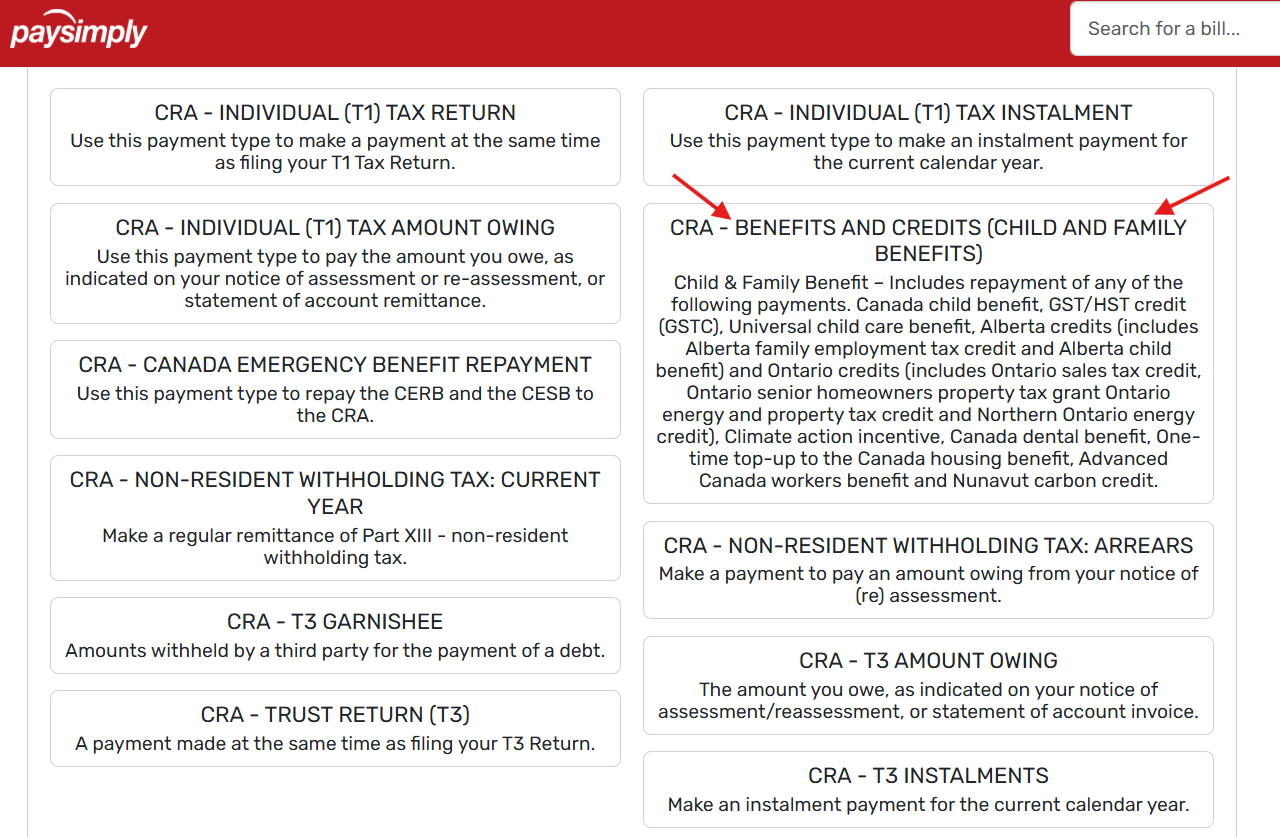
The CRA recommends PaySimply as an approved third-party provider. To make a payment:
- Go to the PaySimply website.
- Select “Canada Revenue Agency” as the payment recipient.