
How to File Your Own Canadian Tax Return:
A simple FAQ + very important things for first-time filers
Before we dive in, the information on this page is not for you if you permanently left Canada during the tax year you are filing for.
You cannot file online. Instead, you must submit your Canadian tax return on paper.
Situations, when you should get professional tax help
In these situations, it’s strongly recommended to speak with a tax professional. The rules can be complex, especially when foreign income and tax treaties are involved.
- You earned foreign income while living in Canada
For example, if you worked remotely for an employer in your home country, you need to report this income in Canada. Tax you already paid abroad may qualify for a foreign tax credit. - You had self-employment income
Self-employment can be more complicated because you may have business expenses and deductions to claim. - You rented out your home outside Canada
Rental income will also need to be reported on your Canadian tax return.
Online tax filing for the 2026 tax year opens on February 22, 2027. You cannot file your return before then.
The Canadian tax year is from January 1 - December 31
Filing Deadline: April 30
The CRA accepts online tax filings year-round, not just up to the deadline.
Did you know you have up to 10 years to file your tax return if you’re expecting a refund?
⚠️ You don’t need a CRA account to file your taxes online. ⚠️

Common questions for the Canadian tax return
What documents do I need to file my Canadian taxes?
Around February/March, you’ll receive your T4 slips from your employers. A T4 is a summary of your earnings and deductions for the year.
You should gather the following before filing your tax return:
- Your SIN (Social Insurance Number)
- All T4 slips from every employer (if you had more than one job)
- T4E slip if you received Employment Insurance (EI) benefits from Service Canada
- T5 slip if you earned more than $50 in interest income from your bank
- Details of any foreign income earned before you came to Canada
Make sure to wait for all slips before filing. Refiling your tax return because a T slip arrived late can be a hassle and may take around four months to process.
How do I get the T4 from the employers?
Employers must issue T4 slips by the end of February. Many larger employers wait until the deadline, so don’t worry if your T4 arrives later.
Usually, you can download your T4 from your employer’s payroll system. If you no longer have access, you can ask your employer to send you a PDF copy.
Your employer may also mail your T4 to the address they have on file. If so, give it until mid-March, as Canadian mail can be slow.
You can also find your T4 in your CRA account, because your employer sends a copy to the CRA. However, this option is not available if you have never filed a Canadian tax return before.
If you haven’t received your T4 by mid-March, contact your employer and ask for a copy. You can politely remind them that there is a late-filing penalty, starting at $10 per day. > Here is the link you can send them for more pressure. <
If you don’t get an answer, you have options that > are shown here. <
Will I get money back?
It depends on your situation — but many first-time filers and newcomers do receive money back. You will receive a refund if too much tax was deducted from your pay.
Your tax refund as a temporary worker depends primarily on three things:
- How much you earned in total
- How much tax was already withheld from your paychecks
- When you entered Canada during the tax year (yes, the date of entry matters a lot in your first tax return)
Can I file my Canada taxes online if I file for the first time?
Yes! Even if this is your first time filing, you should be able to file online if you have a Canadian address.
Sometimes, the information in the CRA’s system doesn’t match what you entered in your tax software. If that happens, you won’t be able to file online and will need to file a paper return instead.
Don’t worry—it’s easy. Just print the return you prepared in your tax software, sign it, and mail it to the CRA.
You can find the correct mailing addresses > here < under “Resident individuals”
Which software do I use for the Canadian tax return?
If you’re still in Canada and have a Canadian address, it’s pretty easy to file your own taxes if your situation is simple—for example, if you only earned employment income. Free tax software like Better Tax works great for this.
Some people use TurboTax, though it can feel overwhelming because it asks many questions to prepare the tax return.
When using the software, skip any prompts to import your T4, register for a CRA account, or visit the CRA website. First-time filers can’t use these features yet.
Simply skip those steps and enter your information manually.
How do I know I am a tax resident?
There’s no one-size-fits-all rule when it comes to determining your tax residency in Canada. While spending more than 183 days in Canada is one factor, it’s not the only one. What really matters are your residential ties—both in Canada and in your home country.
It’s also important to remember that Canada’s tax system is based on residency status, not immigration status.
Wondering if you’re a resident or non-resident for taxes? Click > here to find out! <
To help you with the decision:
- Did your spouse/common-law partner and/or children come with you to Canada?
- Did you buy or rent a home with a rental agreement? (Not a room in shared accommodation or staff housing.)
If you answer “yes” to both questions, you have enough ties to be considered a part-year resident of Canada from your date of entry.
If you don’t have a spouse or children, or you are not renting a home, these are some common secondary residential ties that can support your Canadian tax residency. Did you:
- Open a Canadian bank account?
- Buy a car?
- Exchange your driver’s licence during the tax year?
- Get health insurance through a Canadian province or territory?
The more secondary ties you have, the stronger your case for being considered a Canadian tax resident.
As a tax resident, you have to pay Canadian tax on your worldwide income from the date you became a resident. This means you must report income earned both inside and outside Canada on your tax return.
Here are some important links you can use to determine your tax residency:
- The CRA has a guidance on tax residency determination > here <
- For more information on residential ties, see Income Tax Folio S5-F1-C1, Determining an Individual’s Residence Status
- If you are still unsure, you can fill out a form to get the CRA’s opinion on your tax situation (processing of this form could take a few months): Form NR74, Determination of Residency Status (entering Canada)
Ready to file your Canadian tax return?

Important info for first-time filers who entered Canada in the tax year
When using the tax software, be sure to answer all questions carefully to ensure your information is accurate. The questions are generally straightforward, so there’s no need to go into every single detail here.
For screenshots, I’m using Better Tax because it has a clean and user-friendly interface.
Two key questions to look out for
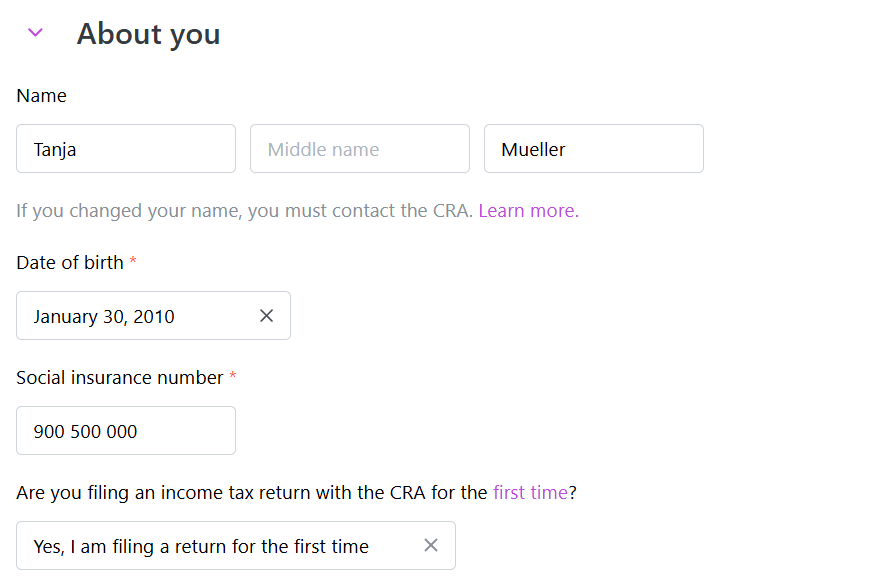
“Are you filing an income tax return with the CRA for the first time?”
Your answer must be Yes
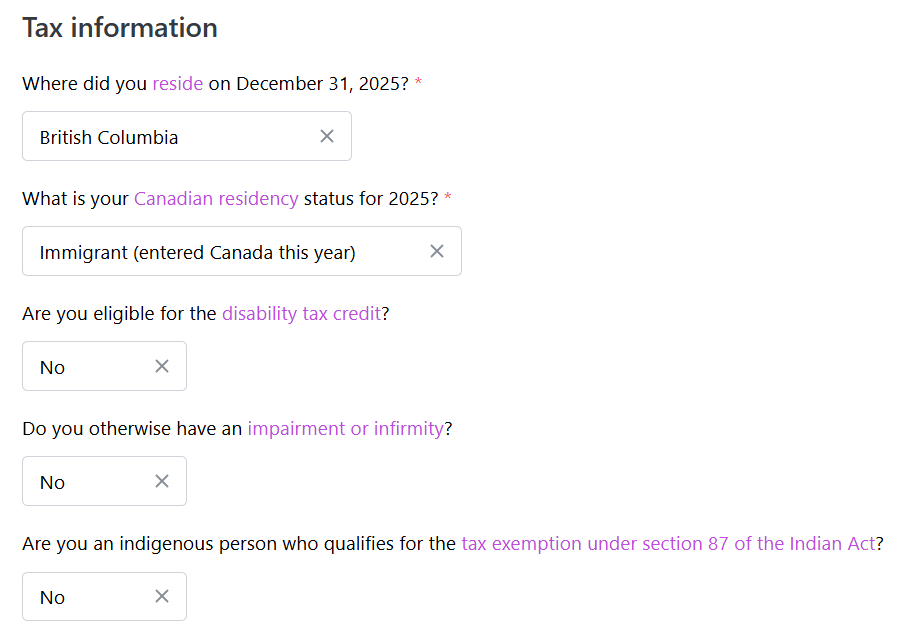
“What is your Canadian residency status for [the tax year]?”
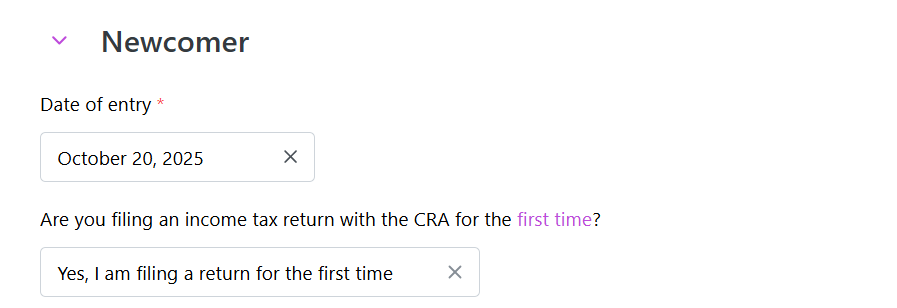
The software will then ask about your date of entry further down in the process.
Then it will ask about your income before you arrived in Canada (the time when you were not yet a resident).
If this applies to you:
- Enter the amount in the “Foreign-source income” section.
- You must report the amount in Canadian dollars (CAD).
- To convert your foreign income, use the official exchange rate from the >> Bank of Canada.
If you didn’t earn any income from January up to your arrival date, simply enter $0 in that section.
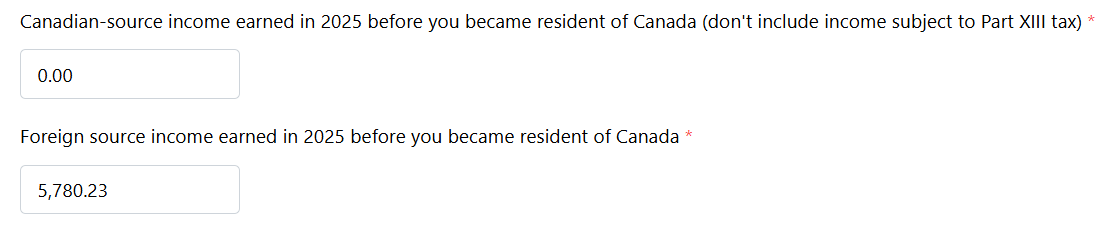
⚠️ Income earned before arriving in Canada is not taxed in Canada.
The tax software only uses this information to calculate any additional credits and benefits you may be eligible for. To correctly calculate these credits, your world income (income earned both inside and outside Canada in the tax year) must be reported.
It’s very important to enter your date of entry correctly.
If you skip this step, the software thinks you were a full-year tax resident. This can cause it to calculate the full amount of certain tax credits, even though you were only a resident for part of the year.
⚠️ If you entered Canada in the tax year, you cannot claim the full year tax credits. The tax credits must be prorated exactly for the time you spent in Canada.
That’s why the software asks for your exact entry date. It tells the software that you were only a resident of Canada for part of the year.
The software will then automatically adjust your tax credits based on how long you were a Canadian resident.
✅ You don’t need to calculate anything yourself—the software does it for you.
For presentation purposes, here a very simple example:
The federal tax credit for the tax year 2025 is $16,129
You entered Canada on October 1, 2025
($16,129 : 365 days) x 92 days spent in Canada = $4,065.39
The software will automatically claim $4,065.39 in federal tax credits on your return.
Do you notice the difference compared to the full tax credit amount of $16,129?
Employers usually base their tax deductions on that full-year amount, which is why the numbers might not perfectly line up at tax time.
Depending on how much tax was already deducted from your pay, you may either get a refund or owe a bit back.
The same applies to provincial tax credits — the software will automatically pro-rate those too. Each province has its own specific credit amounts.
Wondering why your tax refund is lower than expected?
I worked in two or more provinces. Which province do I file in?
Your provincial tax is based on where you lived on December 31 of the tax year, not where you worked.
For example, if you worked in Alberta and British Columbia but lived in Alberta on December 31, select Alberta as your province of residence.
I left Canada after December 31. Can I still file my taxes for the previous tax year?
Yes, you can still file, even if you left Canada shortly after the tax year ended. However, you cannot file online.
For example, if you left Canada in March and no longer have a Canadian address, you can still use tax software. Just enter your foreign address.
You will then need to print your tax return and mail it to the CRA. The software will tell you how to do this.
Below is a screenshot from Better Tax Software.
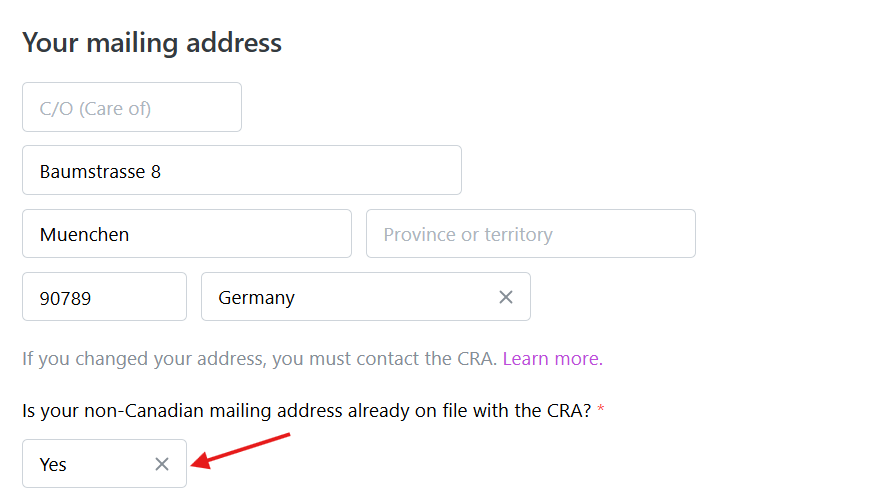
Answer yes when asked if the CRA already has your address on file. Otherwise, the software won’t give you the option to print your tax return.
At the end, after you’ve entered all your other information, such as your T4s, you’ll see a “Print and mail” option. You cannot file online because your address does not match the one the CRA has on file.
Since this is your first time filing a tax return, the CRA’s address on file is the one you provided when you applied for your SIN.
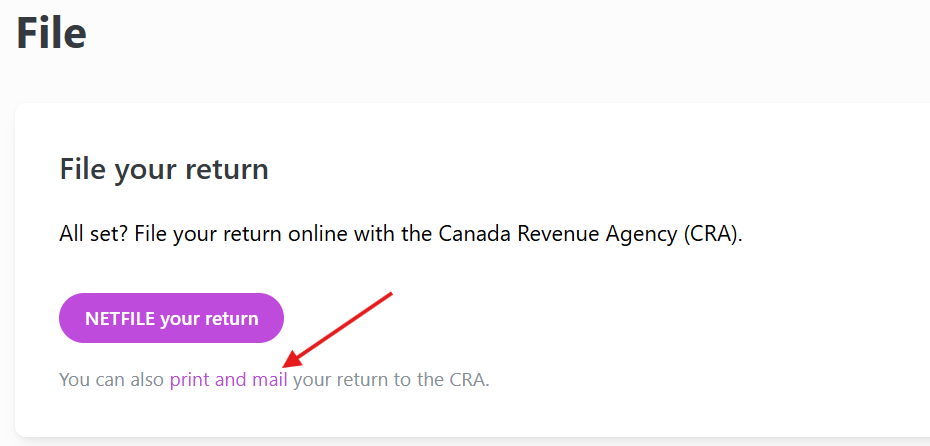
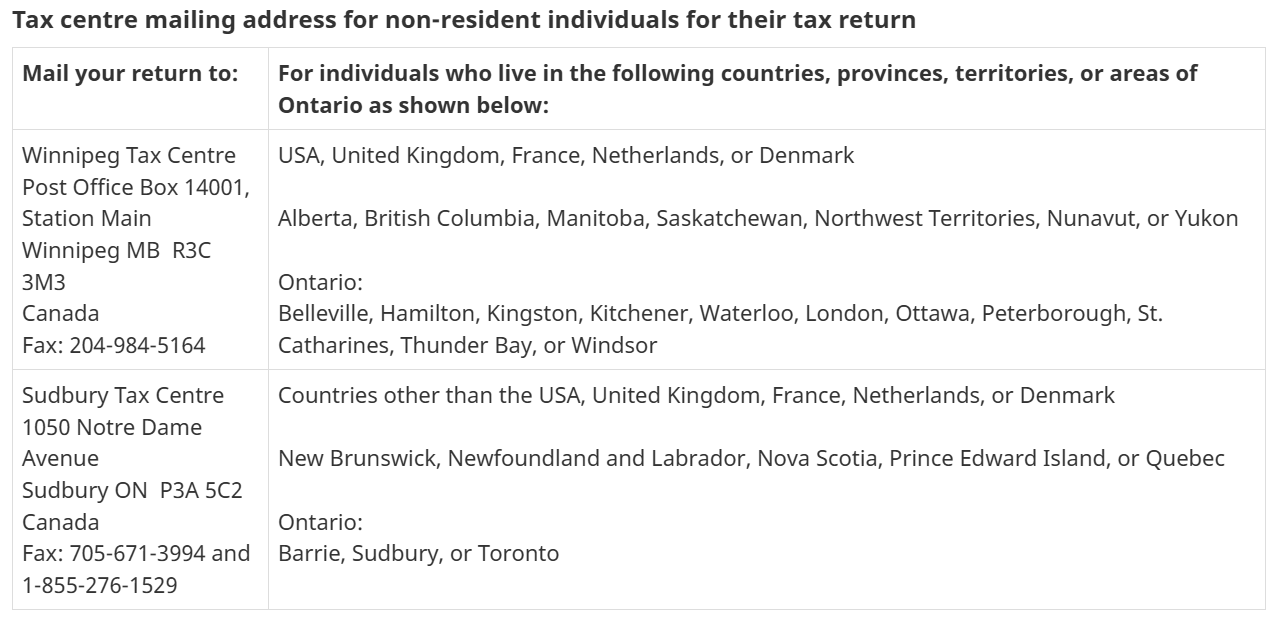
Download the PDF from that link, sign and date it, then mail your tax return with all the T4 to the appropriate address listed >> here under “Non-resident individuals.”
Is tax filing mandatory in Canada?
You have to file taxes if any of the following applies to you.
- You have to pay tax for the year (you owe taxes)
- You want to claim a refund
- You want to claim the Canada workers benefit (CWB) or you received CWB advance payments in the year
- You want to claim the GST⁄HST credit
- The CRA sent you a request to file a return
- You were self employed and your total income for the tax year was over $3,500
The entire list >> here << on the official government homepage
I entered Canada in the tax year, but I didn't earn money in Canada. Do I have to file taxes?
If you didn’t earn any income in Canada during the tax year, you don’t have to file a Canadian tax return.
For example, if you arrived in Canada in October but didn’t start working until the following year, you don’t need to file for that first year.
However, you could miss out on government benefits and credits if you don’t file.
If you have residential ties in Canada and are a tax resident, it’s a good idea to file a return with $0 Canadian income and report your income from before you arrived in Canada, as explained in the steps above.
Why it’s a good idea to file a Canadian tax return, even with $0 income:
Claim government benefits and credits
- Canada Groceries and Essentials Benefit (CGEB): Paid quarterly to eligible residents.
- Canada Child Benefit (CCB): If you have children.
- Canada Carbon Rebate (CCR): Paid in provinces that participate.
Filing a return ensures the CRA has the info it needs to calculate these correctly.
After filing your first tax return, you can register for a CRA online account. It allows you to:
- Keep your mailing address and personal information up to date.
- Set up direct deposit so future CRA payments, including your next tax refund, go directly to your Canadian bank account.
What can I claim on my Canadian tax return?
If you worked as an employee, there are usually not many deductions you can claim.
Common examples are medical expenses, charitable donations, tuition, childcare expenses, and certain employment expenses.
>> See the common Canadian tax deductions and credits for a typical IEC participant <<
How long is the processing time for a Canadian tax return?
It depends on how you file your tax return.
- Online tax returns take about 10 business days.
- By regular mail as a tax resident: about 6-8 weeks
Does the CRA offer direct deposit?
Yes, the CRA offers direct deposit to Canadian bank accounts only.
However, your first tax refund will be issued as a cheque. Once your first return has been processed, you can:
After that, future tax refunds and other CRA payments can be deposited directly into your Canadian bank account.
I had interest income in my savings account and did not receive a T5; should I include it in my tax return?
Banks generally issue a T5 slip if you earn more than $50 in interest during the tax year.
Even if you don’t receive a T5, you still must report all your income, including interest, on your tax return.
How do I proceed if I did remote work for an employer in my home country?
If you worked remotely for a company in your home country while living in Canada, things get a bit more complicated.
- You must report this foreign income on your Canadian tax return in the “Foreign Income” section.
- You may be able to claim a foreign tax credit for any taxes you already paid abroad.
Because of tax treaties and double taxation rules, it’s a good idea to consult a tax professional to avoid mistakes.
The same applies to self-employment income, which can be more complicated because you may have business expenses to claim.
If you have foreign income or were a part-year resident, it’s best to look for a CPA who has experience with cross-border tax. Search for a CPA in your province, such as “CPA Alberta.”
Their services will cost more, but they can help make sure your tax return is prepared correctly and that any relevant tax treaties are taken into account.

I tried submitting my tax return online, but I received an error code.
Most online filings usually go through without any problems, even for first-time filers. However, sometimes the information in the CRA’s database doesn’t match what you entered in the tax software. You will have 5 attempts to correct the error.
One of the biggest causes of CRA rejections is a name mismatch - NETFILE Error N1
The most common error involves your name, especially if you have a double first name or a middle name.
Don’t worry—this is usually easy to fix, and you may still be able to file online.
If you still have your Service Canada paperwork, enter your name exactly as it appears on your SIN application. In some cases, both your first and middle name need to be entered in the “Name” field instead of using the separate “Middle name” field.

If your name includes hyphens, try entering it with and without the hyphens and then try submitting your return again.
Another error occurs if there are invalid characters in forms
In Canada, there are no special characters like the German ä, ö, ü, or ß. If your name contains these letters, write them as ae, oe, ue, or ss. This rule also applies to any other special characters.
Correct your entry and try submitting again. If it still doesn’t work after five attempts, follow the instructions to mail your tax return to the CRA.
How to file your tax return on paper
Download the PDF from the link, sign and date it, then mail your tax return with all the T4 to the appropriate address listed >> here under “Resident individuals.”
When you mail your return, processing takes a bit longer. Paper returns typically take about 6–8 weeks for the CRA to process. In this case, patience is key 😉

I was successful with filing my taxes online, what happens next?
Great! Once you’ve successfully filed your Canadian tax return online:
- You’ll receive a confirmation number.
- Keep it for your records.
- You’ll will receive an Express Notice of Assessment (NOA) immediately or within a few hours.
- It will be delivered into your CRA Account.
- This is a preliminary assessment, not your final NOA.
- Your final Notice of Assessment will be available in your CRA account once the CRA has processed your return, within about 10 days.
- In most cases, the final NOA will match the Express NOA.
- If the CRA makes any changes, they will be shown on the final NOA along with an explanation.
- If you’re receiving a refund by cheque, it will be sent by regular mail.
- This can take around 2–4 weeks.
After you received your Notice of Assessment, you can:
to receive future tax refunds and other tax benefits into your Canadian bank account.
I am leaving Canada next year; how can I file taxes then?
At some point, every Canadian adventure comes to an end. If you’re planning to leave Canada next year, you’ll still need to file a tax return for the year you lived and worked there.
The good news is that it’s completely manageable. Check out >> this blog post on what to do before leaving Canada to ensure a smooth and hassle-free tax filing process next year. Think of it as your final Canadian adventure task before heading home!
If you’d like some extra help with your Canadian tax return, Canadataxback can assist you. Canadataxback uses tax software designed for tax professionals, which can handle all kinds of situations—including entry and exit dates, non-resident status, and foreign addresses.
Since 2014, Canadataxback has been helping IEC participants with their taxes. The service fee is only $50, making it an excellent option compared to other taxback services.